HoMedics Humidifier Not Misting? Fixes From the Manuals
Low water, a loose tank, the humidistat or a scaled-up transducer: how to get a HoMedics humidifier misting again, and why humidifiers keep turning off.
By Clean Air Guides editorial teamUpdated 8 min read
In this article
- 1. Check the power and the mist setting
- 2. Refill the tank (auto shut-off)
- 3. Reseat the tank and tighten the cap
- 4. Check the humidistat setting
- 5. Clean the transducer (and reset the CLEAN light)
- 6. Top-fill models: clean the water outlet valve and float
- 7. Replace the demineralization cartridge
- Why does my humidifier keep turning off?
- When to contact HoMedics
If your HoMedics humidifier isn’t misting, work through the checks the HoMedics manuals list, in this order: power, water level, tank seating, the humidistat setting, and finally a scaled-up transducer. If the unit misted fine for weeks and then faded, we’d suspect the transducer first; HoMedics’ fix is a 50/50 white vinegar wipe. Everything below comes from HoMedics’ own instruction books for its ultrasonic models.
Here’s the whole checklist at a glance:
| Step | Likely cause | What to do |
|---|---|---|
| 1 | No power, or the mist control is off | Try another outlet, check the breaker, then the power/mist setting |
| 2 | Tank almost empty (auto shut-off) | Refill with clean, cool (not cold) water |
| 3 | Tank not seated or cap loose | Tighten the cap clockwise and reseat the tank firmly |
| 4 | Humidistat set below room humidity | Check a hygrometer, then raise the setting or use continuous mode |
| 5 | Mineral deposits on the transducer | Wipe it with 50/50 white vinegar and water; reset the CLEAN light |
| 6 | Dirty water outlet valve or float (top-fill models) | Rinse the tank reservoir; clean the float hinge with 50/50 vinegar |
| 7 | Spent demineralization cartridge | Replace it every 30 to 40 fillings, sooner with very hard water |
1. Check the power and the mist setting
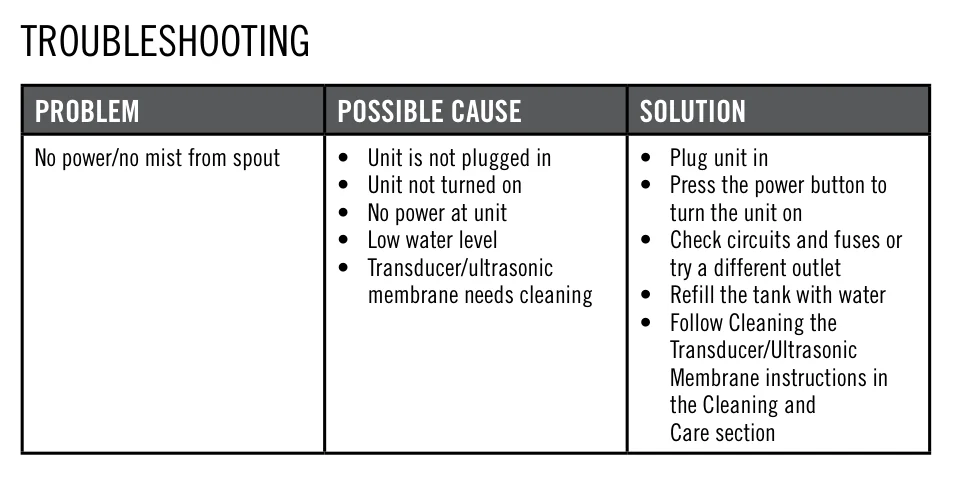
The “No power/no mist” row in each HoMedics manual we reviewed starts with the basics: the unit isn’t plugged in, isn’t switched on, or there’s no power at the outlet. Try a different outlet and check your circuit breaker or fuses.
Then check the mist setting. On the UHE-CM65, the Power/Mist knob turns clockwise to switch on and raise output. On the UHE-CM18, the power button cycles through modes: the first press is low mist, the second is high, and the third turns it off, so it’s easy to switch it off by accident. On warm mist models, give it time. HoMedics says warm mist on the UHE-WMTF185 takes about 20 minutes to heat up.
2. Refill the tank (auto shut-off)
HoMedics models such as the UHE-CM65 and UHE-CM18 have an automatic shut-off. When the tank is almost empty, the unit stops humidifying to tell you to refill it; on the UHE-CM18 the power/out-of-water light turns red. Refill with clean, cool (not cold) water. The UHE-CM18 manual says not to use water above 86°F.
3. Reseat the tank and tighten the cap
After filling, HoMedics says to turn the tank cap clockwise until it’s tight and to place the tank back on the base so it is firmly seated. A tank that isn’t seated properly can keep water from reaching the base. TaoTronics, for example, lists reinstalling the tank as the fix for a low-water light that stays on, and we’d lift and reseat the tank even if it looks right. On dual-tank models such as the UHE-WM130, check that each tank is seated.
A small amount of water in the base during and after use is normal, according to HoMedics.
4. Check the humidistat setting
Models with a built-in humidistat stop misting once the room reaches the humidity you set. The UHE-WM130, UHE-CMTF91 and UHE-WMTF185 manuals all list “humidistat set lower than current room humidity” as a no-mist cause. On the UHE-WM130, the humidistat runs from 35% to 55% in 5% steps; once it reaches your setting, the unit cycles off until humidity falls 5% below it.
The fix is to raise the setting or switch to continuous operation (CO, the default on the UHE-WM130). We’d check a room hygrometer before raising it, though; our guide on how to check humidity in your house covers hygrometers. If the room is already near 50%, the humidifier is doing its job, and the EPA advises against humidifying above 50%. Our guide to the ideal indoor humidity explains the target range.
5. Clean the transducer (and reset the CLEAN light)
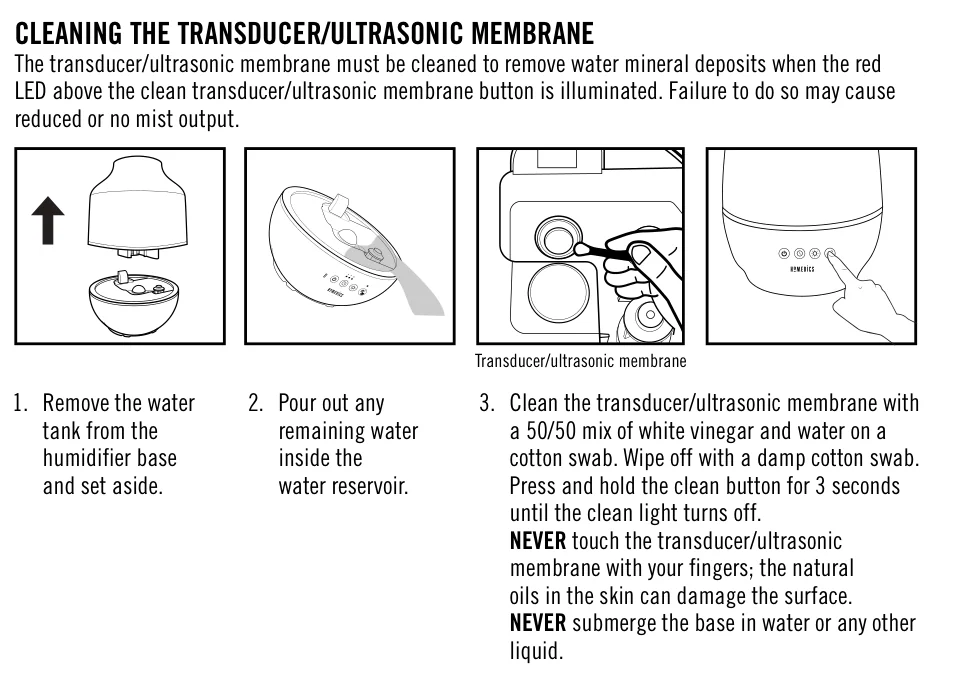
The transducer, also called the ultrasonic membrane, is the small disc in the base that makes the mist. HoMedics’ newer manuals warn that if mineral deposits aren’t cleaned off it, you may get reduced or no mist. Models with a CLEAN light tell you when: on the UHE-CM18 it lights red after 60 hours of use, on the UHE-WM130 after 120 hours.
How to clean it (UHE-CM18, UHE-WM130, UHE-CMTF91, UHE-WMTF185):
- Unplug the unit and remove the tank.
- Pour out the water left in the reservoir. On the UHE-WM130, remove the transducer cover.
- Wipe the transducer with a cotton swab dipped in a 50/50 mix of white vinegar and water.
- Wipe it again with a swab dampened with plain water, and replace any cover.
Older UHE-CM65 and UHE-CM45 models: pour the 50/50 white vinegar and water mix onto the membrane and into the reservoir, let it soak for 5 minutes, brush gently with a soft-bristle brush (not included), then rinse.
Important: Never touch the membrane with your fingers (HoMedics says skin oils can damage it), never use detergent on it and never scrape it with a hard object. Never submerge the base in water.
Reset the CLEAN light after cleaning and refilling:
- UHE-CM18: press and hold the clean button for 3 seconds until the light turns off.
- UHE-WM130: press and hold the power button for 3 seconds.
- UHE-CMTF91: press and hold the clean indicator/reset button until the red light turns off.
6. Top-fill models: clean the water outlet valve and float
On the top-fill UHE-CMTF91, HoMedics also lists a water outlet valve that needs cleaning. The manual’s sequence: remove the tank and, over a sink, twist off the water reservoir at the bottom of the tank and empty it. Reattach it, add 13 oz (385 mL) of water, swish it in all directions, and empty it again. Then clean the transducer as above.
The UHE-WMTF185 has a float. HoMedics says to clean the float hinge with 50/50 white vinegar and water to remove calcified minerals as needed. TaoTronics lists a stuck float as one reason a low-water light stays on.
7. Replace the demineralization cartridge
If your model uses a demineralization cartridge (the UHE-CM65 takes the UHE-HDC4), HoMedics says to replace it every 30 to 40 fillings, sooner with very hard water, and to soak a new one in water for 10 minutes before installing it. HoMedics also says to replace it sooner if white dust increases (our guide to humidifier white dust explains where it comes from). If you need one, search for the HoMedics UHE-HDC4 cartridge by its part number. HoMedics recommends distilled water if you have hard water, which also slows scale on the transducer. Our guide to what kind of water to use in a humidifier explains why.
Don’t add anything else to the water. HoMedics says never to use water-softening additives, and that even a few drops of essential oil will damage the unit. Our guide to essential oils in a humidifier covers what other makers’ manuals say.
Why does my humidifier keep turning off?
This applies to most brands, not just HoMedics. A humidifier that runs for a while and then stops is usually doing what it was designed to do:
- Low water: auto shut-off kicks in when the tank is nearly empty, as the HoMedics manuals describe. Refill, and check that the tank is seated so water actually reaches the base.
- Target humidity reached: a humidistat or Auto mode switches the unit off once the room hits the set level. Levoit’s Classic 300S manual says the unit may turn off in Auto mode when humidity is above the target. HoMedics’ UHE-WM130 cycles off until humidity drops 5% below the setting.
- A stuck float: TaoTronics says to free a stuck float so it rises with the water, and Crane says to clean the water-level float with warm sudsy water when the red low-water light won’t go out.
- A timer: if your model has one, check it isn’t set.
If it switches off in a room that still feels dry, check the humidity reading on the display. Levoit says an incorrect reading can come from moisture building up on the sensor; turn the unit off, let it dry, and point the nozzle away from the sensor.
Other no-mist causes from other brands’ manuals
Crane, Levoit, Honeywell and TaoTronics manuals add a few causes HoMedics doesn’t list. We’d rule these out on any ultrasonic unit before calling support:
- Too much water in the base can stop misting. Empty the base and reseat a full tank.
- A blocked air inlet or fan vent. Don’t run it on carpet or a towel.
- Detergent residue. If the tank or base was washed with soap, rinse until there’s no foam or smell.
If the transducer is clean and the unit still won’t mist, a deeper clean may be due. Our guide on how to clean a humidifier covers the full routine.
When to contact HoMedics
If you’ve cleaned the transducer, the tank is seated, the humidistat is set above room humidity and there’s still no mist, we’d contact HoMedics rather than open the base.
- US: 1-800-466-3342, Monday to Friday, 8:30am to 7:00pm EST, or [email protected].
- Canada: 1-888-225-7378, Monday to Friday, 8:30am to 5:00pm EST.
Warranty: the term depends on the model. HoMedics’ current humidifier manuals (UHE-CM18, UHE-WM130, UHE-CMTF91, UHE-WMTF185) state a 2-year limited warranty, while older UHE-CM65 and UHE-CM45 manuals state 1 year. The 2-year warranty covers defects in materials and workmanship from the date of purchase or delivery, whichever is later. To claim:
- Have a copy of your sales or gift receipt ready. HoMedics requires it for all claims.
- Contact Consumer Relations and get a Return Authorization number before you ship anything.
- You pay to ship the product to HoMedics; HoMedics pays to ship the replacement on valid US claims.
Purchases from unauthorized sellers void the warranty. HoMedics says Amazon, Walmart.com and eBay purchases count only when the item was shipped and/or sold by HoMedics. Registering within 10 days of purchase (homedics.com/register) gets you faster service.
If your unit is leaking rather than not misting, see why is my humidifier leaking.
Frequently asked questions
Why is my HoMedics humidifier on but not misting?
The HoMedics manuals list low water, a tank that isn't firmly seated, a humidistat set below the room's current humidity, and a transducer that needs cleaning. On top-fill models such as the UHE-CMTF91, a dirty water outlet valve can also stop the mist.
How do I reset the CLEAN light on a HoMedics humidifier?
Clean the transducer first, then hold the button for 3 seconds: the clean button on the UHE-CM18, the power button on the UHE-WM130. On the UHE-CMTF91, hold the clean/reset button until the red light turns off.
How do I clean a HoMedics humidifier transducer?
Remove the tank, pour out the water in the reservoir, wipe the transducer with a cotton swab dipped in 50/50 white vinegar and water, then wipe it with a damp swab. Never touch it with your fingers or use detergent or a hard object on it.
Why does my humidifier keep turning off?
Usually because it's nearly out of water (auto shut-off) or because it has reached the humidity you set, so the humidistat or Auto mode switches it off until the room dries out. A tank that isn't seated or a stuck float can also trigger the low-water shut-off.
How long is the HoMedics humidifier warranty?
It depends on the model. Current HoMedics humidifier manuals state 2 years, while older UHE-CM65 and UHE-CM45 manuals state 1 year. You need a sales or gift receipt and a Return Authorization number from HoMedics before sending anything.
Related guides
Humidifiers
How to Clean a Humidifier: Daily Rinse, Descaling and Disinfecting
Empty and dry it daily, descale and disinfect it every third day, and follow your manual. Step-by-step, with brand notes for HoMedics, Crane, Dyson and more.
12 min read
Humidifiers
Why Is My Humidifier Leaking? Causes, Fixes and When to Stop
A loose cap seal, a cracked tank, moving it while full or mist set too high: how to find where your humidifier is leaking and fix it safely.
8 min read
Humidifiers
How to Use a Humidifier: Setup, Settings, Water and Daily Care
Set it on a flat, waterproof spot, fill it with the right water, aim for 30–50% humidity and empty it every day. A step-by-step guide from setup to storage.
8 min read
Humidifiers
Humidifier White Dust: What It Is and How to Stop It
White dust is tap-water minerals thrown into the air by ultrasonic and impeller humidifiers. Here is what the EPA and CPSC say and how to stop it.
8 min read